- 1800 72 27 28
- [email protected]
- Suite 20, 27 Hunter Street, Parramatta NSW Australia

ISO 27001 Certified
Find our Microsoft Certified Apps and Services on

Xero Connector for Business Central
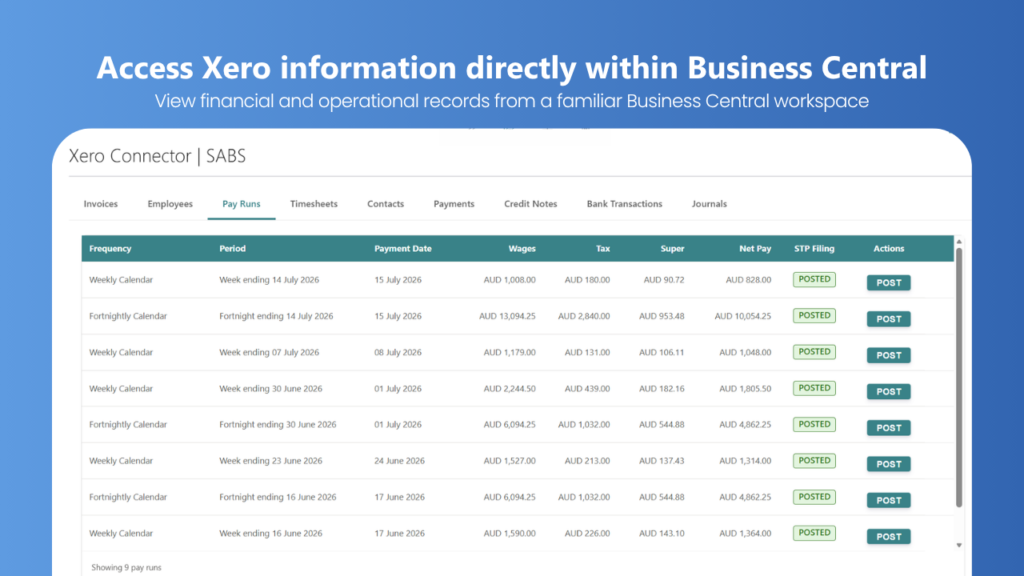
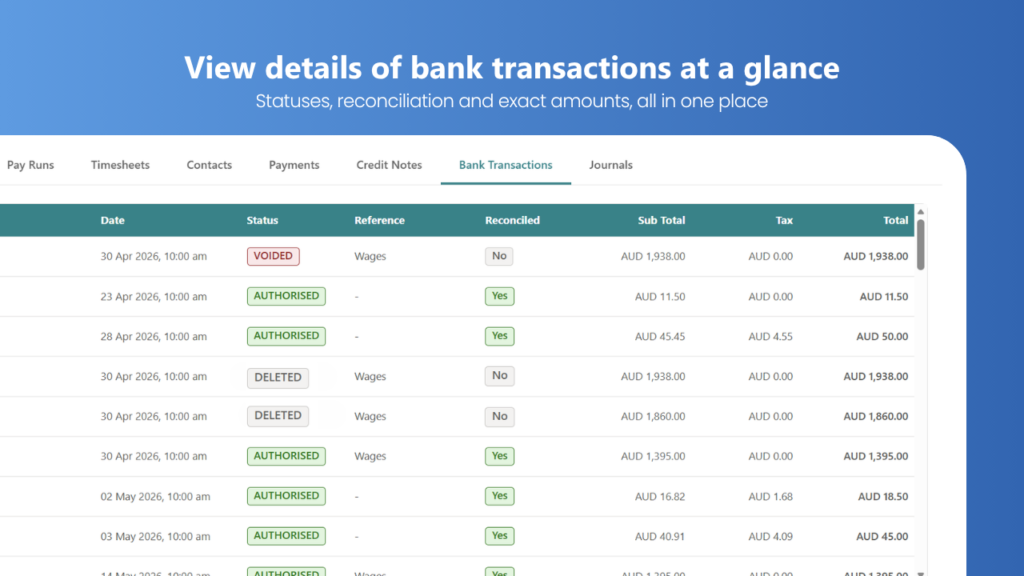
Xero Connector for Business Central provides a centralised view of key Xero information directly within Microsoft Dynamics 365 Business Central. By bringing financial, payroll, and operational records into a single workspace, users can access important Xero data without needing to switch between applications. The solution provides access to invoices, including status, due dates, and general transaction details, enabling users to quickly review customer and financial information from within Business Central. Employee records, pay runs, and timesheets can also be viewed, providing visibility into payroll-related information and workforce activity. Additional tabs provide access to contacts, payments, credit notes, bank transactions, and journals, making it easy to navigate and review information across multiple areas of Xero. Users can drill down into pay runs for further detail and review the status of key records directly from a familiar Business Central interface.
What Is Xero Connector for Business Central?
Xero Connector for Business Central is an integration solution that brings key Xero financial and payroll information into Microsoft Dynamics 365 Business Central. It helps users access Xero records such as invoices, contacts, payments, credit notes, bank transactions, journals, employees, pay runs, and timesheets from a centralised Business Central workspace.
Instead of switching between Xero and Business Central to review information, users can access relevant Xero data within a familiar Business Central environment.
If you are looking to implement or expand your ERP capabilities, explore our Dynamics 365 Business Central solutions for business management and operations.
Key Features of Xero connector for Business Central
Data Migration: Import Customers, Suppliers, Products/Items, Employees, Invoices and Opening Balances from Xero.
Invoice Visibility: View Xero invoices directly in Business Central, including invoice status, due dates, and general invoice information.
Employee Records: Access a list of employees and related information from within a centralised workspace.
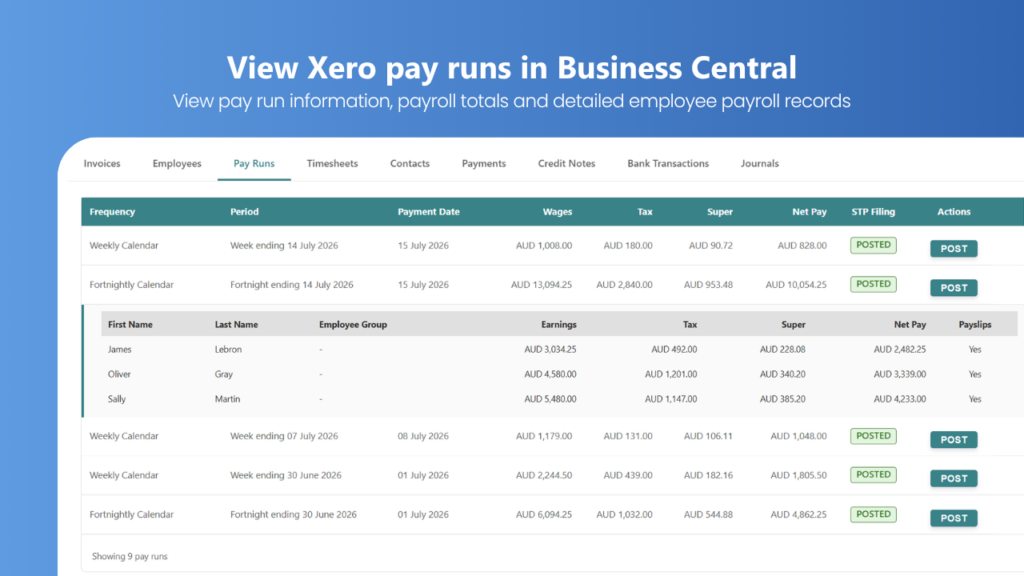
Pay Run Management: Review pay runs, view payroll details and statuses, drill down into individual pay runs for additional information and post pay run in Business Central.
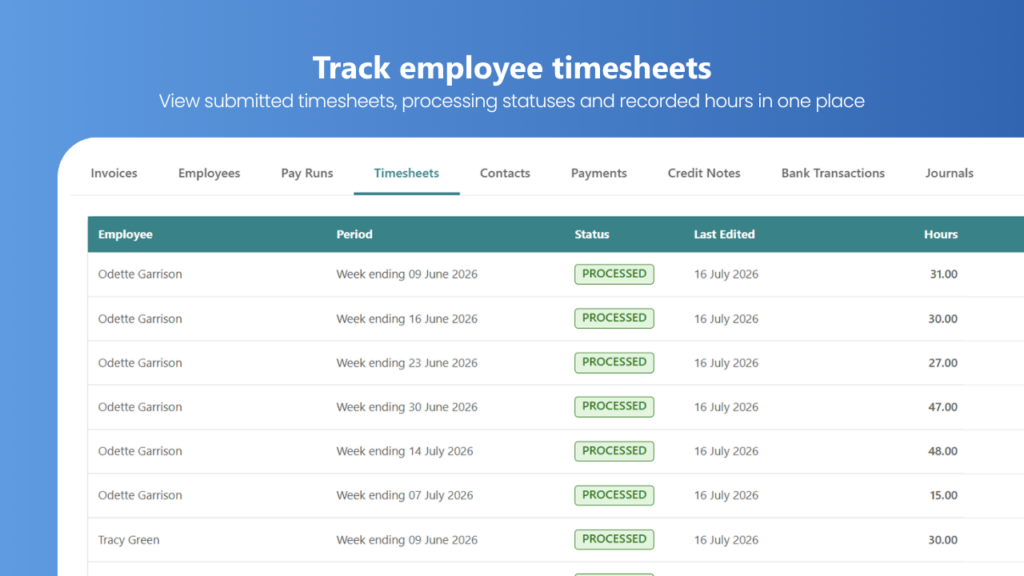
Timesheet Access: View employee timesheets and track timesheet statuses without leaving Business Central.
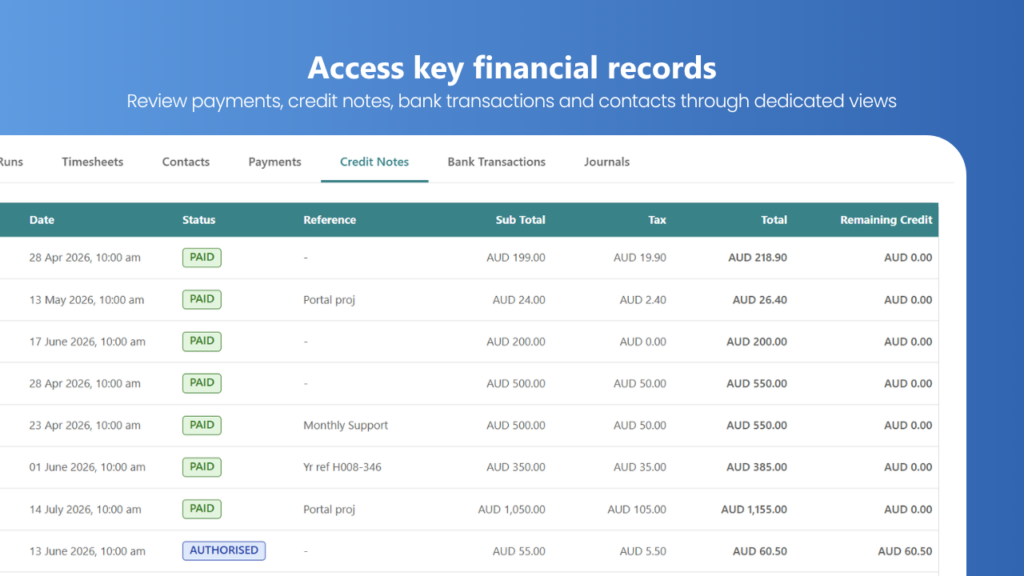
Financial Record Access: Review contacts, payments, credit notes, bank transactions, and journals through dedicated tabs.
Centralised User Experience: Access a broad range of Xero information from a familiar Business Central environment.
Businesses using multiple payment and financial integrations can also explore our Stripe Integration with Business Central solution
How Xero Integration with Business Central Works
Connect Xero and Business Central
Connect the relevant Xero and Business Central environments.
Import or access Xero data
Bring supported Xero information into Business Central or access it through the connector.
Review information in Business Central
Use dedicated tabs and pages to review invoices, employees, pay runs, timesheets and financial records.
Drill down into details
Open relevant records, such as individual pay runs, to review additional information.
Benefits of Xero Integration and Migration
- Reduce application switching
- Centralise access to Xero information
- Improve visibility of financial records
- Simplify access to payroll information
- Review Xero invoices from Business Central
- Access employee and timesheet information
- Support Xero-to-Business Central data migration
- Work from a familiar Business Central environment
For businesses that need direct debit capabilities in Business Central, explore our Business Central Direct Debit for Australia solution.
Xero to Business Central Data Migration
Moving from Xero to Microsoft Dynamics 365 Business Central involves more than making financial information visible in another application. A migration project must identify which records the business needs to transfer, how those records correspond to Business Central data, and how the migrated information will be checked before the new system is used.
Smart App Business Solutions provides a Xero-to-Business Central data migration option for supported data, including customers, suppliers, products or items, employees, invoices and opening balances. The specific records and migration scope should be confirmed before the project begins.
A well-planned migration helps businesses prepare the information required for their new ERP environment while reducing the risk of overlooking important records or balances.
Whether you are replacing Xero as your main business system or moving selected information into Business Central, the first step is to establish your migration requirements and confirm the data that can be transferred.
For broader migration requirements, explore our Dynamics 365 Data Migration services.
Who Can Use Xero Connector for Business Central?
Xero Connector for Business Central can be used by businesses that use Xero and Microsoft Dynamics 365 Business Central and need easier access to Xero financial, payroll and operational information. It can be particularly useful for businesses planning to move from Xero to Business Central, finance and accounting teams, payroll teams, and organisations that need to access selected Xero data within their Business Central environment.
The connector can also support businesses that need Xero-to-Business Central data migration, including the transfer of selected customers, suppliers, products/items, employees, invoices and opening balances.
Plan Your Xero to Business Central Migration
Planning to migrate from Xero to Microsoft Dynamics 365 Business Central? Smart App Business Solutions can help you assess the records you need to transfer, clarify the migration scope and determine the appropriate approach for your business.
Whether you need access to Xero information from Business Central or want to prepare for a full system transition, start by discussing your current environment and requirements.
Contact Smart App Business Solutions to discuss your Xero integration or data migration needs.
- Frequently Asked Questions
Xero and Business Central integration connects the two business systems so users can access supported Xero information from Microsoft Dynamics 365 Business Central. With the Xero Connector, users can review available invoices, contacts, payments, credit notes, bank transactions, journals, employees, pay runs and timesheets within a centralised workspace.
Yes. The Xero-to-Business Central migration capability supports selected data categories, including customers, suppliers, products or items, employees, invoices and opening balances. The exact scope depends on your requirements and should be confirmed before migration.
Start by reviewing your existing Xero data and defining which records need to be transferred. Next, confirm the supported data types, map the relevant records to Business Central, prepare the data, carry out the migration and validate the results. The detailed process depends on your data and project requirements.
The supported categories identified for this solution include customers, suppliers, products or items, employees, invoices and opening balances. Confirm whether additional historical transactions or specialised records are supported for your particular migration.
Integration provides access to supported information across Xero and Business Central, while data migration transfers selected records from Xero into Business Central. The appropriate option depends on whether you plan to continue using both systems or replace Xero with Business Central.
Yes. The connector provides access to Xero invoice information, including invoice status, due dates and general transaction details, through Business Central. The information available depends on the connector configuration.
The connector provides access to supported employee records, pay runs and timesheets. Available details and actions should be confirmed against your required payroll workflows.
Begin by identifying the records you need to retain, confirming the migration scope, reviewing data quality and determining how opening balances and invoice information will be handled. Establish validation requirements before transferring the data.
If you plan to continue using Xero and need to access its information from Business Central, integration may be appropriate. If you plan to replace Xero, data migration may be required. Your intended system setup and business requirements will determine the best approach.
Smart App Business Solutions offers the Xero Connector for Business Central and can help assess your integration or migration requirements. Contact the team to discuss your current systems, the records you need to access or transfer, and the appropriate next steps.