- 1800 72 27 28
- [email protected]
- Suite 20, 27 Hunter Street, Parramatta NSW Australia

ISO 27001 Certified
Find our Microsoft Certified Apps and Services on

Solution for SharePoint Throttling issue in Dynamics 365
Resolve SharePoint Throttling | Optimize Online Performance
When Dynamics 365 is integrated with SharePoint for document management, performance and reliability are critical for business operations. However, organizations often face SharePoint throttling-limit issues when large volumes of data, frequent API calls, or automated processes access SharePoint through Dynamics 365. SharePoint Online enforces throttling limits to protect service availability, but these limits can cause delayed responses, failed uploads, or synchronization errors. Boost SharePoint Online performance with our throttling solution. Prevent throttling errors, speed up workflows, and improve user experience.
Bypass SharePoint Throttling & Optimize Your Workflows
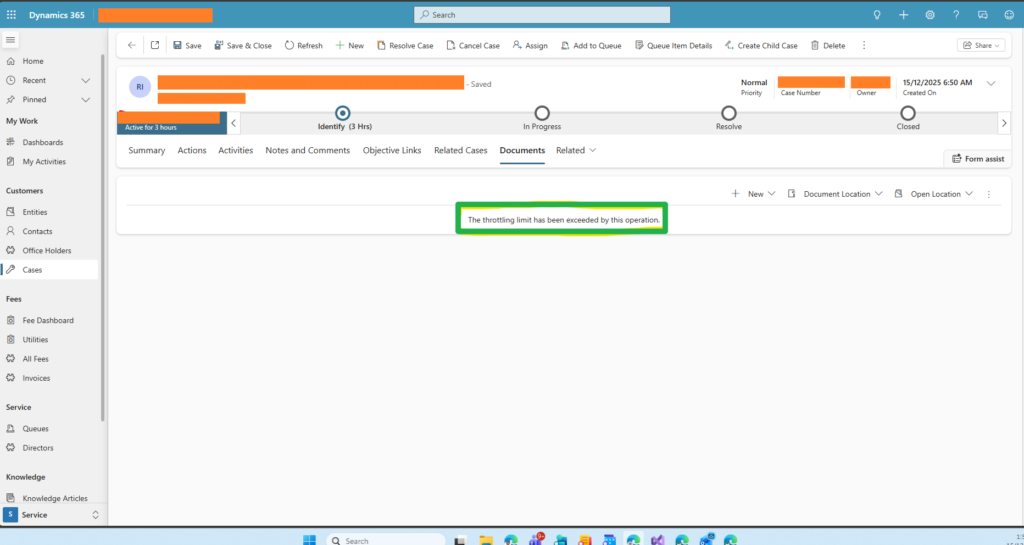
Should you ever come across the error message “the throttling limit has been exceeded by this operation” or “HTTP 429 (“Too many requests”)” or “HTTP 503 (“Server Too Busy”)” something similar to the texts, then you exactly know what SharePoint Throttling is.
SharePoint Online throttling can slow down your business processes, block critical data access, and frustrate users. Our SharePoint Throttling Solution ensures your workflows, apps, and integrations run smoothly without interruptions, helping you maximize productivity and maintain consistent performance.
How Throttling Impacts Your Business
SharePoint throttling is triggered when too many requests are made to the platform in a short time. This often results in:
- HTTP 429 (“Too many requests”) or 503 (“Server Too Busy”) errors
- Delays in workflow execution
- Inefficient Power Automate flows
- Slow or blocked data access in apps
By addressing throttling effectively, businesses can maintain uninterrupted operations and improve user satisfaction.
Our Solution
Our solution is designed to intelligently manage SharePoint requests, prevent throttling, and optimize performance across your environment.
Benefits
- Uninterrupted SharePoint Online workflows
- Reduced errors and downtime
- Optimized Power Automate and custom apps
- Improved user experience and productivity
- Scalable for large lists, libraries, and high-volume integrations
- Frequently Asked Questions?
SharePoint throttling is a protection mechanism in SharePoint Online that limits excessive API requests from Dynamics 365, Power Automate, or custom applications. When too many requests are sent within a short period, SharePoint temporarily blocks or delays them to maintain system stability.
Throttling typically occurs due to high-volume document uploads, frequent API calls, large list queries, Power Automate loops, or synchronous plugins accessing SharePoint libraries. These activities exceed Microsoft’s request limits and trigger temporary restrictions.
Common throttling errors include:
- HTTP 429 – Too Many Requests
- HTTP 503 – Server Too Busy
- “The throttling limit has been exceeded by this operation”
- Slow document uploads or failed syncs
If you see these errors, your SharePoint requests are being rate-limited.
Throttling can slow down or stop critical operations such as document uploads, workflow automation, app integrations, and data synchronization. This leads to delays, reduced productivity, and a poor user experience for teams using Dynamics 365.
You can reduce throttling by:
- Optimizing API calls
- Using asynchronous plugins
- Implementing retry logic with exponential backoff
- Controlling Power Automate concurrency
- Scheduling bulk operations during off-peak hours
These best practices help maintain stable and fast performance.
Yes. Power Automate flows that repeatedly access SharePoint or process large datasets are commonly throttled. Adding delays, limiting parallel runs, and batching requests can significantly improve reliability.
No. Throttling is temporary. Once the request rate decreases and retry intervals are respected, SharePoint restores normal access automatically.
SmartApp Business Solutions provides expert Dynamics 365 and SharePoint integration services, including request optimization, workflow tuning, Power Automate improvements, and performance monitoring to eliminate throttling-related disruptions.