- 1800 72 27 28
- [email protected]
- Suite 20, 27 Hunter Street, Parramatta NSW Australia

ISO 27001 Certified

SharePoint Connector for Business Central
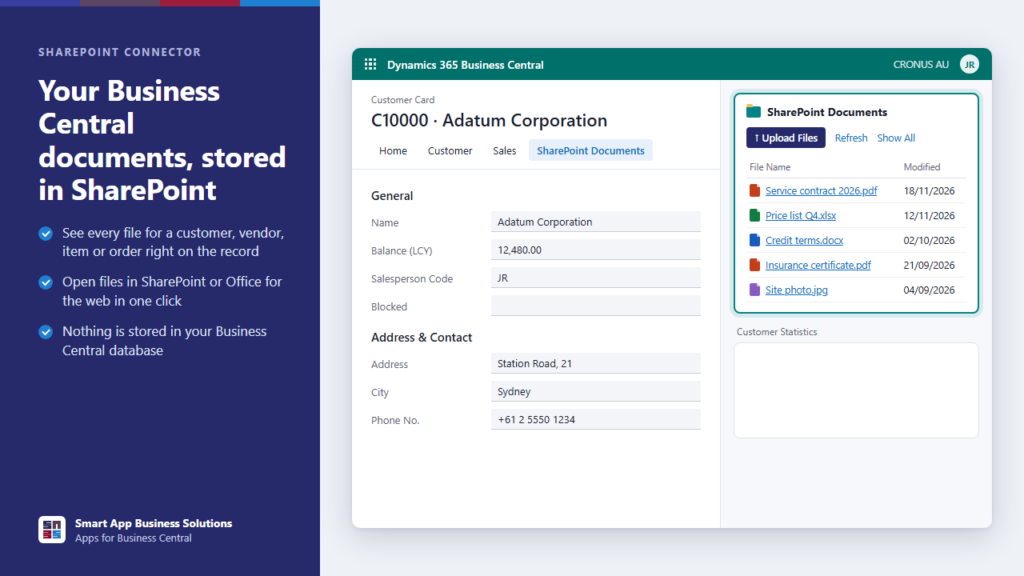
Connect Microsoft Dynamics 365 Business Central with SharePoint Online to simplify business document management. The SharePoint Connector allows you to store, access and manage customer, vendor, item and order documents directly from Business Central. Automatically organise files into record-based SharePoint folders and manage them through the SharePoint Documents FactBox without switching between applications. From uploading contracts and quotations to accessing product documents and purchase order files, everything stays connected to the relevant Business Central record. With documents stored in your own Microsoft 365 tenant, your business can improve document organisation, simplify file access and keep Business Central storage lean.
The Challenge and Solutions
Challenge
Are Your Business Documents Scattered Across Different Locations?
Managing business documents across email attachments, local drives, shared folders and ERP systems can become increasingly difficult as your organisation grows.
Customer contracts, vendor certificates, product specifications, quotations and order documents may be stored in different locations, making them difficult to find, access and share.
Storing large files directly in Business Central can also increase database storage requirements.
Your team needs a more organised way to manage documents while keeping them connected to the business records they belong to.
Solutions
Connect Business Central with SharePoint Online for Better Document Management
The SharePoint Connector brings Business Central document management and SharePoint Online storage together in one connected workflow.
It automatically creates folders for supported business records and displays associated documents through the SharePoint Documents FactBox within Business Central.
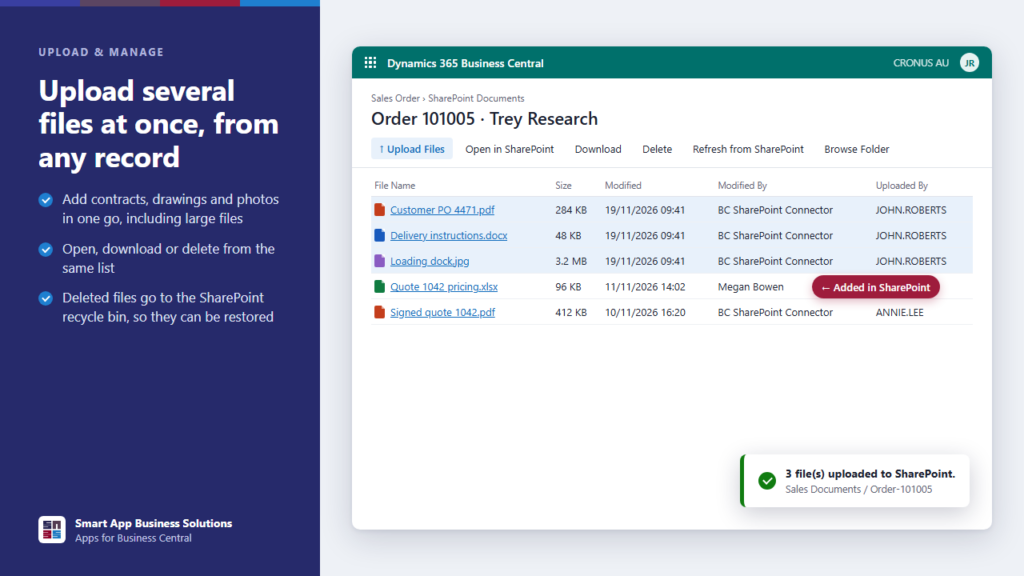
Users can upload, open, download, refresh and delete documents directly from the relevant record. Meanwhile, SharePoint Online stores the actual file content within your organisation’s Microsoft 365 tenant.
How SharePoint Connector for Business Central Works
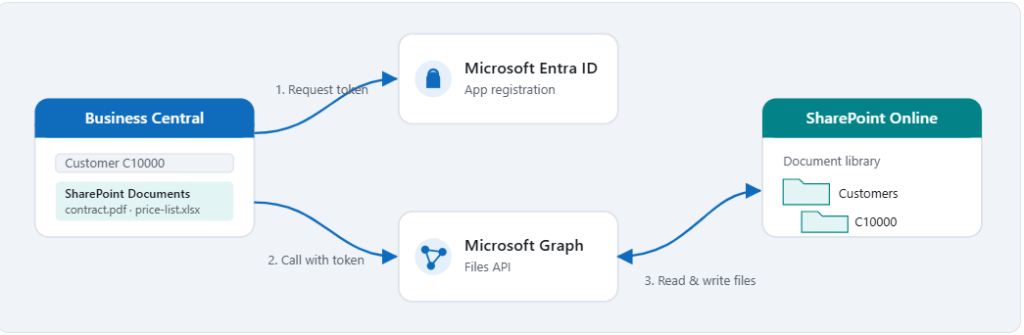
Business Central signs in to Microsoft Entra ID with your own app registration. With the access token it gets, it calls Microsoft Graph to read and write files in one SharePoint document library. Files are stored only in SharePoint. Business Central keeps a link to each file on the record it belongs to.
Key Features of SharePoint Connector for Business Central
Access Documents Directly from Business Central
Manage business documents from Customer Card, Vendor Card, Item Card, Sales Order and Purchase Order pages.
- Upload one or multiple files.
- Open documents in SharePoint or Office for the web.
- Download and delete files.
Automatic Document Folder Organisation
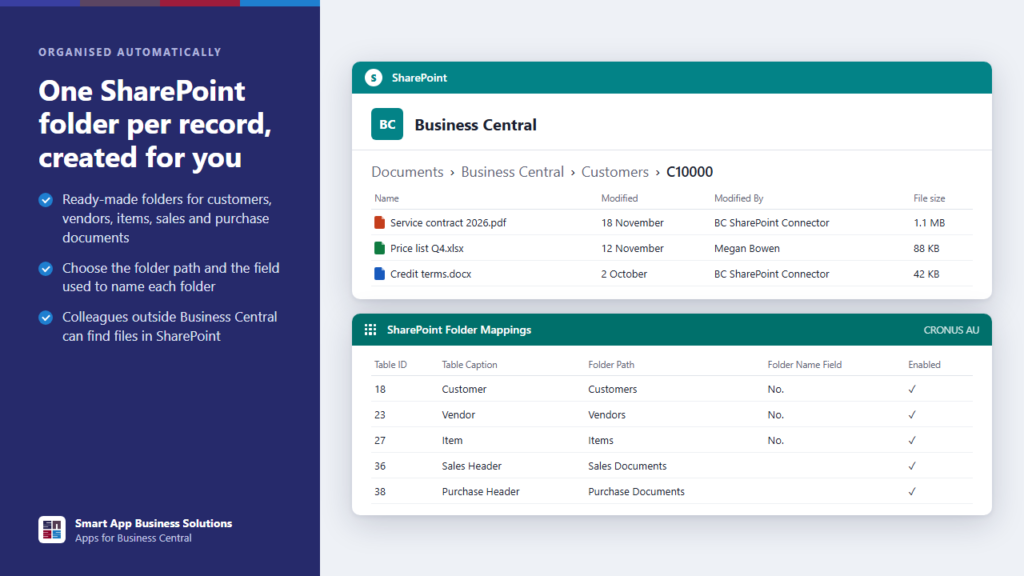
Keep your SharePoint documents organised with automatically created folders linked to Business Central records.
- Create folders automatically when uploading files.
- Support customers, vendors, items and sales and purchase documents.
- Customise folder paths and naming fields.
- View linked documents across your company.
Secure SharePoint Integration
Connect Business Central to SharePoint Online using your own Microsoft Entra ID app registration.
- Microsoft Graph integration for file operations.
- Supports least-privilege Sites.Selected permissions.
- Protected client-secret storage.
- Separate Admin and User permission sets.
Simple Setup and Configuration
Configure your SharePoint integration through an assisted setup experience.
- Guided configuration within Business Central.
- Built-in connection testing.
- Configurable file-size limits and timeouts.
- Optional request logging with retention policy support.
Protection for Copied Environments
Help protect your production SharePoint library when Business Central environments are copied.
- Automatically disables the integration in copied environments.
- Helps prevent test environments from unintentionally modifying production documents.
Extensible for Business Central Developers
Adapt the connector to meet additional document management requirements.
- Customise folder naming through integration events.
- Respond to uploads for additional tables.
- Add the SharePoint Documents FactBox to other Business Central pages.
Benefits of SharePoint Integration with Business Central
Save Time and Improve Productivity
Access and manage documents directly from Business Central without searching through email attachments, shared drives or separate applications.
Keep Documents Organised
Automatically organise customer, vendor, item and order documents into structured SharePoint folders.
Maintain Control Over Your Documents
Keep files in your own Microsoft 365 tenant and use SharePoint permissions, version history and retention policies.
Reduce Business Central Storage
Store document content in SharePoint Online instead of Business Central, helping reduce unnecessary ERP database storage.
Secure Document Storage with Microsoft SharePoint and Business Central
Your own Microsoft 365 tenant: Files remain in your SharePoint Online environment.
Microsoft Entra ID authentication: Uses your own app registration with OAuth 2.0 client credentials.
Microsoft Graph: Handles file operations between Business Central and SharePoint.
Restricted permissions: Supports Sites.Selected as the recommended least-privilege option.
Minimal Business Central storage: Only document references and metadata are maintained in Business Central.
Protected credentials: Client secrets are stored in protected, isolated storage.